Desk Setup Mistake You Never Noticed – 7 Weird Body Problems It Secretly Causes | QuickDawa
Let me paint a picture for you.
You sit down at your desk in the morning feeling perfectly fine.
Maybe you have your tea or coffee ready.
You start working.
Two hours in, your neck starts to feel stiff.
By lunch, your shoulders are tight as a knot.
By evening, your lower back is screaming at you.
And you think maybe you slept wrong last night.
Or maybe you just need more exercise.
But here is the real truth.
There is one tiny desk setup mistake that millions of people make every single day without even knowing it.
And it quietly makes every long workday feel ten times worse.
The worst part?
It takes less than five minutes to fix.
But most people never fix it because they never realize it is the problem in the first place.
I have talked to so many people who spend money on painkillers, massages, and even doctor visits.
All because their desk was set up wrong.
At QuickDawa, we are all about making health simple and easy to understand.
So today, let me walk you through this common mistake, why it hurts your body, and exactly how to fix it right now.
💻 What Is This Desk Setup Mistake Exactly?
Here it is in plain words.
Your monitor or laptop screen is too low.
That is it.
That is the small desk setup mistake that causes so much unnecessary pain.
When your screen sits lower than your eye level, your head tilts forward and down.
Your neck bends.
Your shoulders round.
Your upper back hunches.
And your entire spine shifts out of its natural position.
This might not feel like a big deal for 10 minutes.
But when you do this for 6, 8, or even 10 hours a day?
Your body pays a heavy price.
Doctors call this forward head posture.
Some people call it “tech neck” or “text neck.”
Whatever you call it, the result is the same.
Pain. Stiffness. Fatigue. Headaches.
All from something you never even thought about.
🤕 Desk Setup Mistake – 7 Weird Body Problems It Secretly Causes
Let me explain this in a way that actually makes sense.
Your head weighs about 10 to 12 pounds.
That is roughly the weight of a bowling ball.
When your head sits directly on top of your spine, your neck muscles handle that weight easily.
No stress. No strain.
But for every inch your head tilts forward, the pressure on your neck almost doubles.
A study published by Surgical Technology International found that at a 45 degree forward tilt, your neck feels nearly 50 pounds of force.
That is like carrying a small child on your neck all day long.
No wonder you feel exhausted after work.
Your neck and shoulder muscles are doing overtime just to hold your head up.
This leads to several problems over time.
- Chronic neck pain that does not go away with rest
- Tension headaches that start at the back of the skull
- Tight shoulders that feel like they are glued to your ears
- Upper back pain between the shoulder blades
- Lower back pain because your whole spine compensates
- Fatigue and brain fog because your body is spending energy on poor posture
- Jaw pain and TMJ issues in some people
And most people blame everything except their desk.
🖥️ How to Check If Your Screen Is Too Low
This is a super simple test.
Sit at your desk the way you normally do.
Now look straight ahead without moving your head up or down.
Where do your eyes land on the screen?
If your eyes land on the top one third of the screen, you are good.
If your eyes land in the middle or lower part of the screen, your monitor is too low.
If you are using a laptop on a flat desk with no stand, I can almost guarantee your screen is too low.
Laptops are designed for portability, not for ergonomics.
That is why laptop users tend to have the worst posture problems.
🛠️ How to Fix This Desk Setup Mistake Today
The good news is this fix is easy and often free.
Here are several ways to raise your screen to the right height.
📚 Use a Stack of Books
Seriously.
Grab a few thick books and place your monitor or laptop on top of them.
Raise it until the top of the screen is at your eye level or slightly below.
This costs nothing and works immediately.
🖥️ Get a Monitor Stand or Laptop Stand
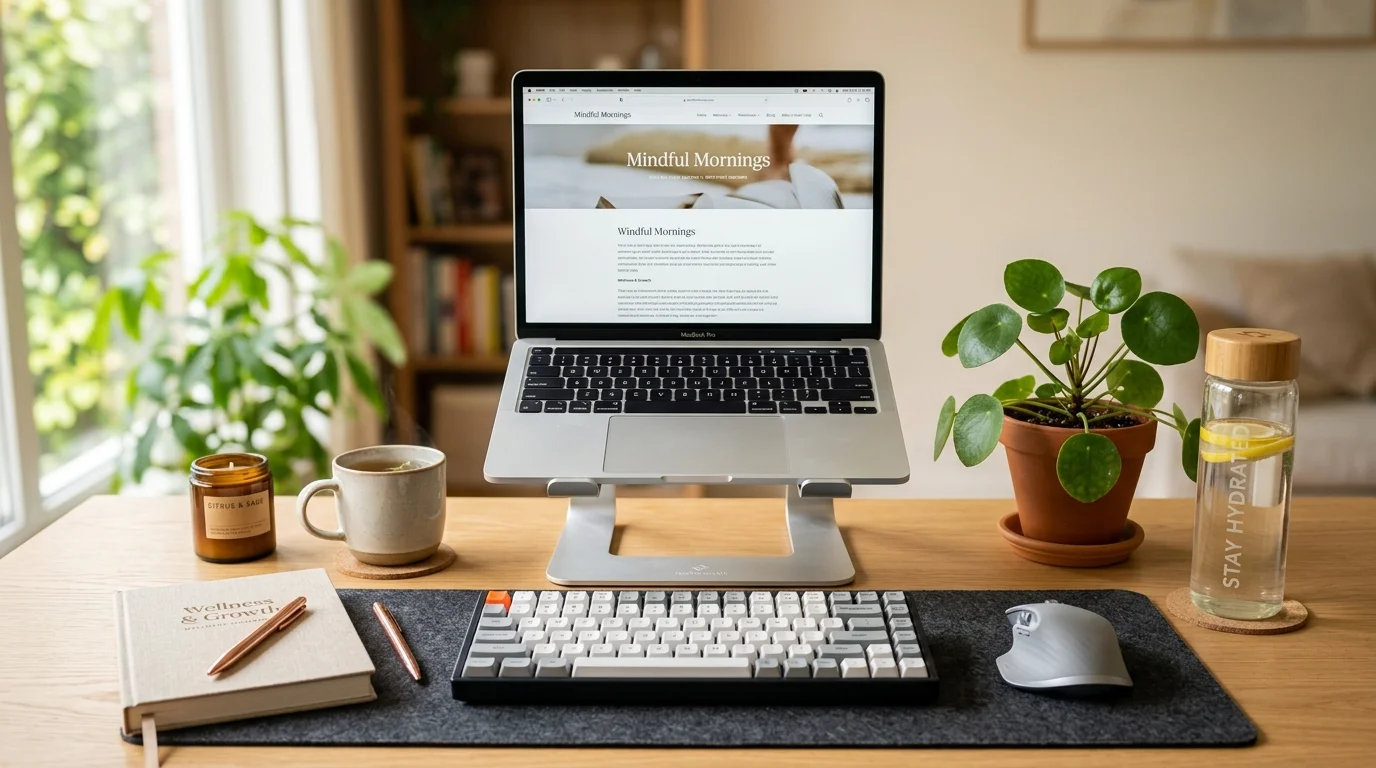
If you want a cleaner look, a simple monitor stand or laptop stand works great.
They are available online for very affordable prices.
A good stand will raise your screen to the right height and also free up desk space.
⌨️ Use an External Keyboard and Mouse
This tip is especially important for laptop users.
When you raise your laptop screen, the keyboard goes up with it.
That creates a new problem because now your arms are reaching up to type.
The solution is simple.
Get an external keyboard and mouse.
Place them at elbow height on your desk.
This way your screen is up high where it should be, and your hands stay relaxed at your sides.
🪑 Adjust Your Chair Height
Sometimes the issue is not the monitor.
It is your chair.
If your chair is too low, everything feels off.
Your feet should be flat on the floor.
Your knees should be at a 90 degree angle.
Your elbows should rest comfortably at desk height.
If your chair cannot go high enough, consider a seat cushion to add height.
🧍 Other Small Desk Mistakes That Make Things Worse
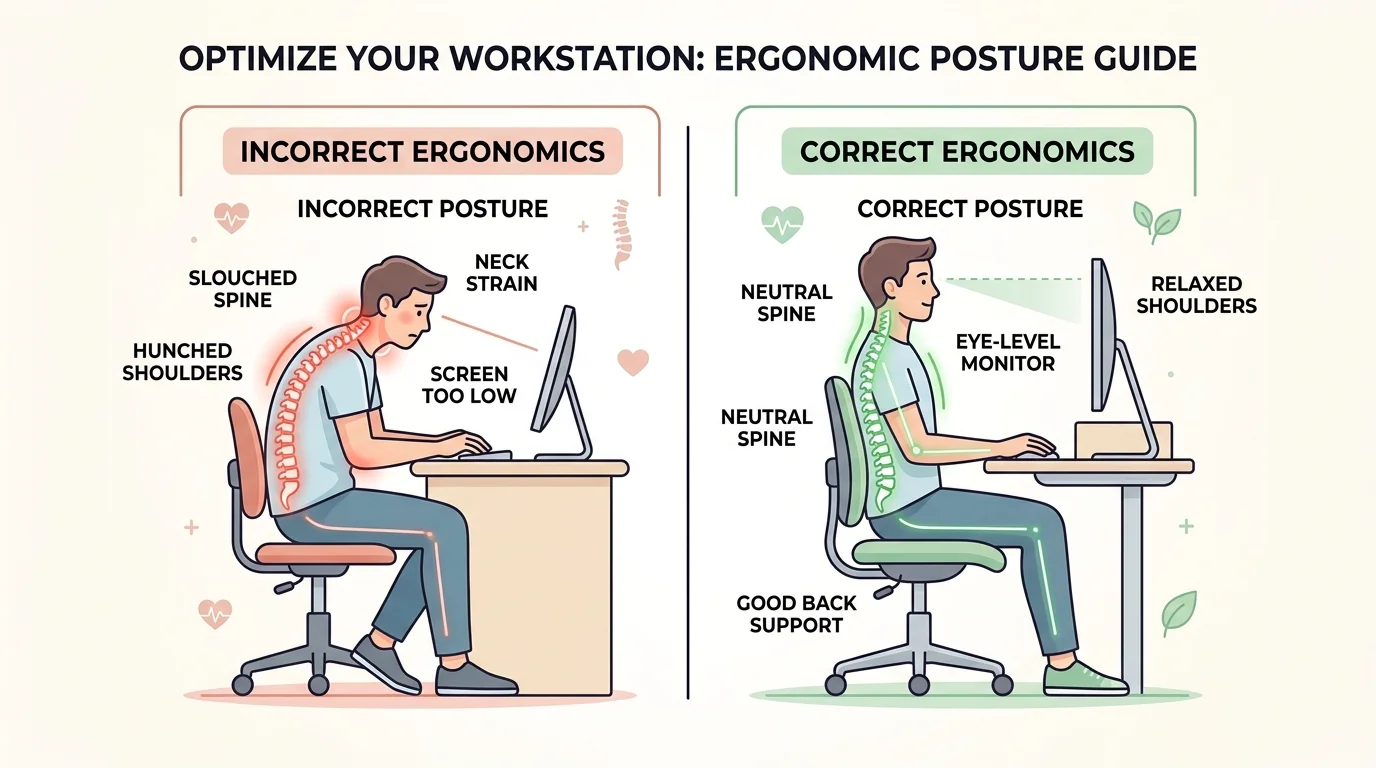
While we are talking about this, let me share a few other common desk setup mistakes that people overlook.
Screen Too Far or Too Close
Your monitor should be about an arm’s length away from your face.
Too far and you lean forward to read.
Too close and your eyes strain.
Keyboard Too High
If your desk is too high, your shoulders shrug up when you type.
This creates tension in your neck and traps muscles all day long.
No Back Support
Sitting in a chair without proper lumbar support lets your lower back round out.
Over time, this causes disc pressure and chronic low back pain.
A small rolled up towel behind your lower back can help if your chair does not have built in support.
Screen Glare
If your screen has a glare, you unconsciously lean and tilt your head to see better.
This throws off your posture without you realizing it.
Position your screen so windows are to the side, not behind or in front of you.
⏰ The 20-20-20 Rule for Long Workdays
Even with a perfect desk setup, sitting too long is still hard on your body.
Here is a simple rule that eye doctors and ergonomic experts recommend.
Every 20 minutes, look at something 20 feet away for 20 seconds.
This gives your eyes a break.
While you are at it, stand up, stretch your neck, roll your shoulders back, and walk for a minute.
This tiny habit makes a massive difference over a full workday.
Your body was not designed to sit frozen in one position for hours.
Movement is medicine.
At QuickDawa, we always say that the simplest health changes often have the biggest impact.
🩺 When to See a Doctor
Most desk related pain improves once you fix your setup and start moving more.
But there are times when you should see a doctor.
- Pain that does not improve after fixing your workstation
- Numbness or tingling in your arms, hands, or fingers
- Severe headaches that happen daily
- Sharp pain in your neck or back when you move
- Weakness in your arms or legs
- Vision changes along with neck pain
These could be signs of nerve compression, herniated discs, or other conditions that need medical attention.
Do not ignore persistent pain.
Getting it checked early is always better than waiting until it gets worse.
🙋 Frequently Asked Questions
Q: Can a bad desk setup cause headaches?
A: Yes. A low screen forces your neck into a forward position, which creates tension in the muscles at the base of your skull. This tension often leads to headaches. Mayo Clinic explains tension headaches here.
Q: How long does it take for posture correction to reduce pain?
A: Many people notice improvement within a few days of fixing their desk setup. But if you have had poor posture for months or years, it may take a few weeks of consistent correction. Cleveland Clinic has great posture advice here.
Q: Is a standing desk better than a sitting desk for back pain?
A: A standing desk can help, but standing all day is not ideal either. The best approach is alternating between sitting and standing throughout the day. Movement matters more than any single position. Harvard Health discusses this topic here.
Q: Can neck pain from sitting at a desk cause dizziness?
A: Yes, in some cases. Tight neck muscles and poor posture can affect blood flow and nerve signals, which may cause dizziness or lightheadedness. If this happens often, see your doctor. WebMD covers cervical vertigo here.
Q: Ergonomic chair vs regular chair for long workdays?
A: An ergonomic chair provides better lumbar support, adjustable height, and proper seat depth. If you spend more than 4 hours a day at a desk, investing in a good ergonomic chair is worth it for your back and neck health. MedlinePlus offers sitting posture guidance here.
🏁 Your Desk Should Help You, Not Hurt You
Let me wrap this up simply.
That stiffness in your neck after a long workday is probably not random.
That tension in your shoulders is not just from stress.
And that lower back ache is not always about getting older.
Often, it is just one small desk setup mistake.
Your screen is too low.
Fix it, and you might be shocked at how much better you feel.
Raise your monitor.
Get an external keyboard if you use a laptop.
Adjust your chair.
Take breaks every 20 minutes.
Move your body.
These are small changes that protect your health for years to come.
At QuickDawa, we believe that understanding what causes your pain is just as important as treating it. Knowledge is the first step toward better health. If you found this guide helpful, share it with someone who sits at a desk all day. Explore more wellness guides on QuickDawa.com for trusted, easy to understand health information.
Got a question or want to share your own desk setup tip? Drop a comment below or reach out to us on our contact page. We love hearing from you.
⚠️ Medical Disclaimer
The information provided in this article is intended for educational and informational purposes only. It is not a substitute for professional medical advice, diagnosis, or treatment. Always seek the guidance of your qualified doctor, pharmacist, or healthcare provider with any questions you may have regarding a medical condition, medication, or treatment plan.
Never disregard professional medical advice or delay seeking it because of something you read on QuickDawa or any other website. If you think you may have a medical emergency, call your doctor, go to the nearest emergency room, or call emergency services immediately.
The health tips and ergonomic recommendations described in this post are provided for general awareness only and may not apply to your individual health situation. Pain and posture issues affect people differently based on age, weight, health conditions, and other factors.
QuickDawa and its authors do not assume any liability for any consequences arising from the use or misuse of information presented on this website.
🌐 Sources and External References
- Mayo Clinic — Tension Headache Causes and Symptoms
- MedlinePlus — Guide to Good Posture
- Harvard Health — The Truth Behind Standing Desks
- Cleveland Clinic — Back Health and Posture
- WebMD — Cervical Vertigo Overview
- Surgical Technology International — Head Weight and Cervical Spine Study